What scleral show means in your report
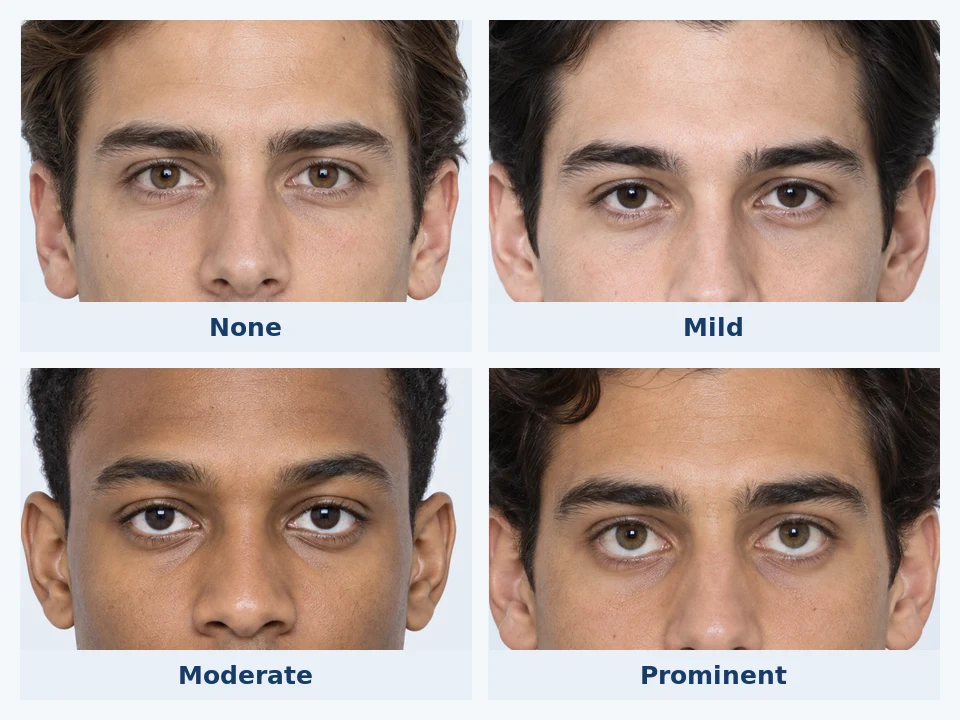
Scleral show describes how much visible white appears between the lower iris and the lower eyelid in the uploaded photo.
What the result means
The result describes the visible lower sclera in the photo, not eye health or facial expression quality.
Gaze direction has a strong effect. Looking upward or holding the camera low can increase the visible band.
How does it work
- 01
Glowometry extends a one-pixel line from each iris centre through its lower iris point, stopping at the height of a stable point below the eye.
- 02
The pixels are converted to grayscale and checked for a distinct brightness valley between the iris and lower eyelid.
- 03
Candidate valleys with strongly unbalanced median RGB channels are rejected as likely skin rather than sclera.
- 04
The detected band length is compared with iris diameter to estimate relative prominence.
Labels you may see
- None
- No visible white is detected between the lower iris and lower eyelid.
- Mild
- A small band of white is visible below the iris.
- Moderate
- A clear band of white is visible below the iris.
- Prominent
- A larger band of white is visible below the iris in the uploaded photo.
For a clearer result
- Use a front-facing photo with the camera level to the eyes.
- Look directly at the camera instead of looking upward or downward.
- Use a relaxed expression and avoid widening the eyes.
- Soft, even light helps separate the iris, lower eyelid, and sclera.
Ready to analyse your facial structure?
Upload a photo and explore your personalised analysis.